Showing posts with label testing. Show all posts

December 5, 2014

Day 5 - How To Talk About Monitors, Tests, and Diagnostics

Written by: Yvonne Lam (@yvonnezlam)
Edited by: Jennifer Davis (@sigje)

Over time, I’ve accumulated a short list of statements about test-like things, a personal category that includes monitors and diagnostics as well as traditional tests, that when I hear them make my heart sink into my shoes:

  • “That isn’t a unit/integration/functional test!”
  • “Why do we need a check for that?”
  • “We need to run our functional tests against the production system all the time and alert when they fail.”

These remarks are strong signals that we lack shared context about what we are trying to accomplish with the tests/monitors/diagnostics in question. Ensuing conversation is likely to be difficult unless we can build some.

I think of the context for a test-like thing in terms of five questions:

  1. Where is it going to run?
  2. When is it going to run? (e.g. What events will cause it to run?)
  3. How often will it run?
  4. Who is going to consume the result? (Answers could be “another service”, “an application that generates time-series data”, “a person”, or a chain of any of the above.)
  5. What is that entity or collection of entities going to do with the result?

These questions compose a heuristic, so I don’t feel that all of them need to be answered precisely every time.

For example:

  • A traditional test runs against a non-production system when the system is built or deployed. It will generally run because of an event such as code change or deployment. It will likely run relatively infrequently, e.g. hours rather than minutes or seconds. A person may look at the result of the test with the goal of fixing a bug before it goes into production, or an automated system may look at the aggregate test results in order to decide on the flow of code through a continuous integration or deployment system.
  • A monitor runs against a production or production-like system on a schedule. Most monitors run frequently, as in on minute or sub-minute intervals, although some may trigger based on other events. The result may be consumed directly by an alerting system such as nagios, or by another system to produce time-series or other data. In the first case, a result may cause an alert to fire, resulting in an alarm going off and potentially a person being paged. In the second case, measured changes in the state of the collected data may cause an alert to fire and a person to be notified, or the collected data may be used for other kinds of analysis or presented in other forms. The eventual consumer of the data will be someone who wants to know the state of the running production system.
  • A diagnostic runs against a production or production-like system on demand. It will be run when there is reason to believe that something is wrong. The result will be used to fix the running system, through reconfiguration or code change/deploy. In sufficiently advanced systems, cheap diagnostics may be run all the time, in order to trigger automated healing of common system errors or conditions.

Note that intent matters: checking to see if, say, nginx is available and serving data may be a test, a monitor, or a diagnostic. footnote1

An immediate benefit of this approach is that it allows discussion of test-like things without first wading through a sea of vocabulary. You don’t have to argue about what the difference between an integration test and a functional test is, or struggle for words to explain why converting unit tests to production monitors is probably not going to be the best use of the time you have to spend on monitoring. For the sake of effectiveness, it’s good to converge on shared terms, but if people already have different vocabulary, then that convergence will be eventual, and you may need test-like things before then.

The main reason why I like this approach is that it allows me to be very specific about what the test-like thing under discussion is supposed to do. Being able to say,

  • “This test-like thing writes data to a database. Do we want it to run every time someone makes a code change, given that we need to set up the database before the test and clean it up afterward?” (probably not), or
  • “If we think something is broken, we need to check that data is getting from A to B. Is that something we want to check once every ten seconds when the system is otherwise healthy?” (it depends)
  • “Our functional tests for account setup create new accounts every time. Do we want to create a new account in production every minute?” (probably not if we can alert on failed attempts and/or unusually low counts of new accounts per unit time) footnote2

makes for a more useful conversation, in my opinion.

Specificity is especially useful when people ask for a type of test or monitor that is not consonant with the way the application or service component under examination has been written. For example, a common response to user-facing bugs that depend on system state and hence are not easy to reproduce is, “Write a functional test and run it as a monitoring check.” This is an excellent idea, since it allows one to track how often the problem happens, get closer to understanding what system state is relevant, etc. It also may not be practical. A test that replicates a user scenario is powerful in part because it exercises the entity being tested at a high level of abstraction; attempts to capture that test in code often results in test code that is fragile, requires more access to service or application internals than is readily available, or involves expensive setup and teardown to run at the frequency required. The more specific you can be about what such a monitoring check actually needs to do and what that requires, the better equipped you are to suggest alternatives, or, in the most extreme case, talk about what would need to change in the application in order for it to be monitored as desired.

Gratuitous piece of advice #1: It’s worth considering whether some of those health checks that run all the time could be replaced either with monitors that feed a system for collecting data for trend analysis or with diagnostics that a person could use to probe a running system when they suspect something is wrong. Gratuitous piece of advice #2: It depends on your service, but if it is data-intensive and/or relies heavily on caching to improve performance, using your functional tests as monitors may not get you the result that you want. Services whose primary purpose is data collection and storage are most likely to get use out of functional tests as monitors. For a service that does real-time or near-real-time data mining, I have found that data-dependent functional tests either are or become problematic as monitors.

December 17, 2010

Day 17 - Smoke Testing Deployments using Cucumber

Written by Gareth Rushgrove (@garethr)

Developers love tests: testing, quality, and inspection tools. Modern testing practices yield automated tests for code and means to run them constantly while developing an application. When the app hits production, the operations team often have a different set of tools for monitoring the health of everything from disk space to requests per second to service health. To get the tested code into the well-monitored production environment, you need to deploy it, and that's where smoke testing comes in.

But What is Smoke Testing?

Smoke testing is non-exhaustive software testing aimed at ensuring that the most crucial functions of an application meet expectations, but skipping on the finer details. Smoke testing your deployments simply means having a test suite you can run very quickly against your production environment just after your deployment to make sure you've not broken everything.

You can write your smoke tests with whatever tool you choose, but I'm going to show some simple examples using the Ruby tool: Cucumber. I've found Cucumber useful for smoke tests as it makes it very simple for everyone involved, including project manager and business stakeholders, to understand what is being tested. Cucumber is useful because smoke tests need to be very fast and targeted to be useful, which means making judgements about what is critical, which requires a common language for communicating what is critical and how it should be tested.

I'm going to run this example using jruby in order to use another great tool, Celerity, which is a jruby wrapper around a headless browser. You don't have use Celerity to do this; lots of people use the Webrat library to make web requests instead. I like Celerity because it can execute the javascript on a page, meaning you can test more complex applications and more complete functionality.

An Example

I'm going to show a real world test from FreeAgent, which checks that the login box appears when you click the login button on the homepage. This would be just one part of a larger smoke test suite but is hopefully a good simple but non-trivial example.

First we need a few dependencies. Here are the instructions for installing on a recent version of Ubuntu, although any system you can run jruby on should be fine.

apt-get install jruby
jruby -S gem update --system
jruby -S gem install jruby-openssl gherkin cucumber celerity rspec

Next we create a cucumber feature file in features/homepage.feature, which describes in a structured but human readable format exactly what we're testing.

Feature: Homepage
  So we can keep existing users happy
  Visitors to the site
  Should be able to login

Scenario: Check login box appears when login button is clicked
    Given I'm on the homepage
    When I click the login button
    Then I should see the login box

You don't have to use cucumber for writing smoke tests, but I find it useful because I can easily discuss what is being tested with other non-developers simply by sharing the feature file contents (above).

Next we write the actual code that makes the test work in features/steps/homepage.rb. I've included everything in one file for simplicities sake but in a larger example you would probably separate out utility functions and configuration from the step code. For a larger test suite you'll also find that you can reuse many steps by passing in arguments from the features files.

require 'rubygems'
require 'celerity'
require 'rspec'

BROWSER = Celerity::Browser.new
TIMEOUT = 20

# this is a simple utility function I use to find content on a page
# even if it might not appear straight away
def check_for_presence_of(content)
  begin
    timeout(TIMEOUT) do
      sleep 1 until BROWSER.html.include? content
    end
  rescue Timeout::Error
    raise "Content not found in #{TIMEOUT} seconds"
  end
end

Given /^I'm on the homepage$/ do
  BROWSER.goto("http://www.freeagentcentral.com")
end

When /^I click the login button$/ do
  check_for_presence_of "Log In"
  BROWSER.div(:id, "login_box").visible?.should == false  
  BROWSER.link(:id, "login_link").click
end

Then /^I should see the login box$/ do
  BROWSER.div(:id, "login_box").visible?.should == true
end

To run the feature we've just created just run the following command in the directory where you created the files - cucumber looks for a 'features' directory.

jruby -S cucumber

This should output test results showing what ran and whether it passed:

Feature: Marketing Site
  So we can keep existing users happy
  Vistors to the site
  Should be able to login

Scenario: Check login box appears when login button is clicked # features/homepage.feature:6
    Given I'm on the homepage             # features/steps/homepage.rb:1
    When I click the login button         # features/steps/homepage.rb:5
    Then I should see the login box       # features/steps/homepage.rb:11

1 scenario (1 passed)
3 steps (3 passed)
0m8.411s

Cucumber provider a number of other output formats that might also be useful (html, etc), and Cucumber Nagios has an output formatter for the nagios plugin format, too:

% jruby -S gem install cucumber-nagios
% jruby -S cucumber --format Cucumber::Formatter::Nagios
CUCUMBER OK - Critical: 0, Warning: 0, 3 okay | passed=3; failed=0; nosteps=0; total=3

Start Simple

A more complex example might step through a multi-stage form to test the purchase of a product, or it could conduct a series of searches to check a search index has been populated. Smoke testing and Cucumber are not just for web apps either. You should be testing all of your important services and systems. Unlike lower level testing you want to touch as many individual parts of the app as possible, including testing that third party API's or parts of your infrastructure are up and running. You definitely don't want to mock out your database calls and then find that the app actually fails due to a problem with the database coming back up after a deployment.

Once you have a smoke test you can run manually each time you deploy, you can take the next step: automation. Running the smoke tests automatically as part of whatever deployment mechanism you have might be useful, logging the results or integrating the output into a reporting tool like nagios might work well for your team, too. Automated deployment followed by a smoke test failure could invoke an automated rollback.

Deployment actions are still a time of higher-than-average risk for most projects, and strong smoke tests are important regardless of your deployment frequency or project size. If you have only a few machines, then smoke testing might tell you that you need to roll back a deployment immediately. If you have a larger infrastructure, then smoke testing a newly upgraded application server before putting it back into a load balancer rotation could save you from any ill effects in production at all.

Further reading:

December 5, 2010

Day 5 - Why Aren't You Doing Code Reviews?

This article was written by Phil Hollenback and is @philiph on Twitter.

I have to admit: I'm on the fence about the devops movement. However, I do think there are a lot of good ideas to be found in the 'devops culture'. One idea I particularly like is that sysadmins should think more like developers. I might be partly attracted to that philosophy because I have a CS degree. However, I also think it's logical because developers have spent a lot of time figuring out development workflows (duh). With the increasing automation in system administration, it's natural that we as sysadmins should follow the same process. Whether we like it or not, we will all be writing more code in the years to come as we increase our use of automation.

I hear that developers are all het up about Agile programming these days. I don't know a lot about that whole methodology either, but I have found some good ideas from skimming the literature. One idea that really excites me as a sysadmin is the notion of code review. Someone once said something like, "with enough eyes, all bugs are shallow" and that is exactly what code review accomplishes. My group has embraced code review as an operational concept and it has greatly increased the quality of our work. Thus, I'm here to spread the word: everyone should be doing code review on any scripts, programs, or text config files destined for production.

THE TOOLS

In my workplace our code review tools are Bugzilla, Subversion, and Review Board. There are other code review products out there but we already had Review Board (http://www.reviewboard.org) set up so it was an obvious choice. This process is tool-agnostic: you could use any combination of version control, bug tracker, and code review if you wanted.

The first step in the process is to create a tracking bug. In my organization we say "if there isn't a bugzilla, it doesn't exist". Don't waste my time with an email thread. The bug will be used for all subversion commit messages and will be referenced in the review board posting. We use a subversion post-hook that requires all log messages to include a bugzilla reference to help enforce this.

Once you have the bug/ticket/issue, you check the existing files out of subversion and make your changes. Note that we have a lot of YAML-formatted text config files that we keep in subversion as well, so we use code review for changes to those as well.

Now you have a subversion diff you can submit to Review Board. You might want to run 'svn diff' to sanity check your diff before submitting. If you like what you see, submit your code review like this (from your subversion working directory):

$ post-review -p --bugs-closed 12345 --description "fix fencepost error" \
  --summary "system healthcheck scripts" --target-group sysadmins

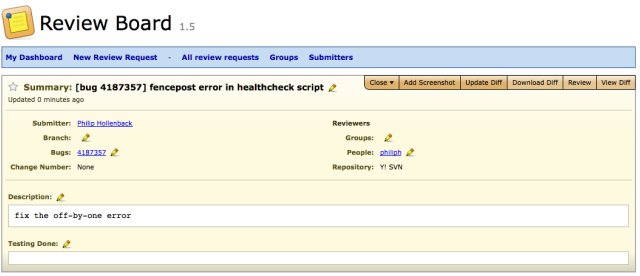
The above will create your code review, publish it, and reference the bugzilla from the first step. It will also send an email out to the 'sysadmins' group which you've already configured in Review Board. That email contains a link to the review in Review Board. Here's what the main screen for a pending code review request looks like:

review main screen

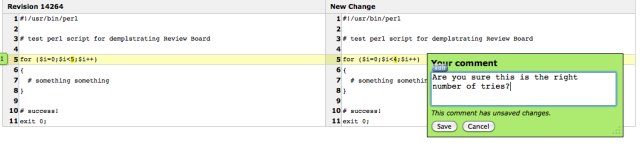
The next step is up to the reviewers. Typically you will send a code review to a group of reviewers, and wait for any one of them to sign off on your review. Review Board allows reviewers to make general comments about all the diffs in a review, and/or comments on specific line numbers.

Viewing the diff for a change:

view the diff

Adding a comment to a specific line number:

adding a comment

Once a reviewer is satisfied with all their comments, they publish their review so you can see it. They can either select the 'ship it!' button or leave it unchecked, depending on whether or not they feel your changes are acceptable. If the reviewer doesn't check 'ship it!', the expectation is that you will fix the problems and submit another review request. Review Board supports review revisions via using the '-r' option to post-review, so you don't need to create multiple review requests.

ship it

Continue this iterative process for adjusting your code until your reviewer signs off by checking the 'ship it!' button on their review. Congratulations, you now have a code review change! Go check it in to subversion and prepare for deployment.

WHY DO ALL THIS WORK?

While the effort to generate code review is not terribly substantial, it does complicate your workflow. Why do this at all? One simple reason: it makes your code or config files better! This is due to several reasons:

  1. If you work in an environment where code review is the norm, you unconsciously write better code because you know someone is going to look at it. Maybe it doesn't always work out that way, but I know I stop myself form doing sloppy things if I know someone is going to critique my work.
  2. Code review serves as a final check to catch stupid mistakes. You are blind to dumb typos in your own code. Other reviewers tend to find them with much more regularity. This is largely because they don't know the flow of your code so they have to look through it all carefully.
  3. Code review serves as a barrier for, lets say, "less experienced" peers. You all know what I'm saying here. Often people are afraid to admin they don't know how to fix some problem assigned to them. Solution? Take a best guess shot in the dark and pray it works. My classic example: I asked a sysadmin once to randomize his cronjob running on many servers as to not overload a particular service. He did the work and we put the new script into production on several thousand machines. Then we started seeing regular overloads on the service in question at the same time every hour. When we inspected the randomized code, we found the sysadmin had picked a random time delay value and then used THE SAME VALUE on every host. If you don't do code review you don't find problems like this.
  4. A real benefit that should not be overlooked is that code review can be an incredible learning tool for both junior and senior sysadmins. Junior sysadmins need to learn about everything so your feedback helps them immediately. The effect with senior sysadmins is more subtle. We are creatures of habit and develop our coding techniques early in our career. Tools evolve and we often don't bother to follow up on advancements. If someone else reviews your code, that gives them an opportunity to suggest better approaches to problems. This can be a real eye-opener if you haven't read the manuals in a while.
  5. Code and configuration style and quality can be enforced. If you have a style guide (you should!), you can use code review to both enforce style and educate about style. You can enforce code-style spacing, usage, etc, and also enforce larger concepts like requiring tests for each change, etc.

One thing to keep in mind is that code review is actually easier and less time-consuming for sysadmins than for developers. Developers write code all the time, and they write a lot of code. Sysadmins typically perform many duties besides writing scripts, and thus the amount of review work is correspondingly reduced. In our experience in a group of 6 people, code review create a minimal amount of overhead.

CONCLUSION

I'm here to tell you that code review works, and it works particularly well for system administrators. Formalized code review is a rising tide that lifts all boats - we all write better code and configurations when others look at it. Review Board in particular provides a fairly simple and lightweight way to implement code review. Code review is your first line of defense in many ways. When a script breaks in production, the first thing I say is, "was it code reviewed"?

Everyone knows that question is going to be asked so we plan accordingly and write better code. I'm not talking about large coding projects here either - even the simplest of scripts should be code reviewed. In fact, small scripts can benefit the most because those are the ones you are most likely to write quickly and carelessly. So please take my recommendations to heart - implement a code review culture for system administration. It will have a measurable effect on your team's performance and will definitely reduce production outages.

Further reading: