December 19, 2016

Day 19 - Troubleshooting Docker and Kubernetes

Written by: Jorge Salamero (@bencerillo)
Edited by: Brian O'Rourke (@borourke)

Container orchestration platforms like Kubernetes, DC/OS Mesos or Docker Swarm help towards making your experience like riding an unicorn over a rainbow, but don’t help much with troubleshooting containers:

  • They are isolated, there is a barrier between you and the process you want to monitor and traditional troubleshooting tools run on the host doesn’t understand containers, namespaces and orchestration platforms.
  • They bring a minimal runtime, just the service and its dependencies without all the troubleshooting tools, think of troubleshooting with just busybox!
  • They are scheduled across your cluster… containers move, scale up and down. Are highly volatile, appearing and disappearing as the process ends, gone.
  • And talk to each other through new virtual network layers.

Today we will demonstrate through a real use case how to do troubleshooting in Kubernetes. The scenario will use is a simple Kubernetes service with 3 Nginx pods and a client with curl. In the previous link you will find the backend.yaml file we will use for this scenario.

If you are new to Kubernetes services, we explained how to deploy this service and learned how it works in Understanding how Kubernetes DNS Services work.To bring up the setup, will run:

$ kubectl create namespace critical-appnamespace “critical-app” created$ kubectl create -f backend.yamlservice “backend” createddeployment “backend” created

And then will spawn a client to load our backend service:

$ kubectl run -it –image=tutum/curl client –namespace critical-app –restart=Never

Part1: Network troubleshooting Kubernetes services

From our client container we could simply run a test by doing root@client:/# curl backend to see how our Kubernetes service works. But we don’t want to leave things loose and we thought that using fully qualified domain names is a good idea. If we go and check Kubernetes documentation it says that every service gets this default DNS entry: my-svc.my-namespace.svc.cluster.local. So let’s instead use the full domain name.Let’s go back to the curl client container shell and run: root@client:/# curl backend.critical-app.svc.cluster.local. But this time curl hangs for 10 seconds and then correctly returns the expected website! As a distributed systems engineer, this is one of the worst things that can happen: you want something to fail or succeed straight away, not a wait of 10 seconds.To troubleshoot what’s going on, we will use sysdig. Sysdig is an open source linux visibility tool that offers native visibility into containers, including Docker, Kubernetes, DC/OS, and Mesos just to name a few. Combining the functionality of htop, tcpdump, strace, lsof, netstat, etc in one open source tool, Sysdig gives you all of the system calls and application data in the context of your Kubernetes infrastructure. Monitoring Kubernetes with Sysdig is a good introduction to using the tool with Kubernetes.

To analyze what is going on, we will ask sysdig to dump all the information into a capture file:$ sudo sysdig -k http://127.0.0.1:8080 -s8192 -zw capture.scap

I’ll quickly explain each parameter here:

-k http://localhost:8080 connects to Kubernetes API

-s8192 enlarges the IO buffers, as we need to show full content, otherwise gets cut off by default

-zw capture.scap compresses and dumps into a file all system calls and metadataIn parallel, we’ll reproduce this hairy issue again running the curl command: # curl backend.critical-app.svc.cluster.local. This ensures that we have all the appropriate data in the file we captured above to reproduce the scenario and troubleshoot the issue.Once curl returns, we can Ctrl+C sysdig to stop the capture, and we will have a ~10s capture file of everything that happened in our Kubernetes host. We can now start troubleshooting the issue either in the cluster or out of band, basically anywhere we copy the file with sysdig installed.$ sysdig -r capture.scap -pk -NA “fd.type in (ipv4, ipv6) and (k8s.ns.name=critical-app or proc.name=skydns)” | less

Let me explain each parameter here as well:

-r capture.scap reads from a capture file

-pk prints Kubernetes fields in stdout

-NA shows ASCII output

And the filter between double quotes. Sysdig is able to understand Kubernetes semantics so we can filter out traffic on sockets IPv4 or IPv6, coming from any container in the namespace critical-app or from any process named skydns. We included proc.name=skydns because this is the internal Kubernetes DNS resolver and runs outside our namespace, as part of the Kubernetes infrastructure.

Sysdig also has an interactive ncurses interface htop alike

In order to follow along with this troubleshooting example, you can download the capture file capture.scap and explore it yourself with sysdig.Immediately we see how curl tries to resolve the domain name but on the DNS query payload we have something odd (10049): backend.critical-app.svc.cluster.local.critical-app.svc.cluster.local. Seems like for some reason curl didn’t understand I gave it a fully qualified domain name already and decided to append a search domain to it.

[…]

10030 16:41:39.536689965 0 client (b3a718d8b339) curl (22370:13) < socket fd=3(<4>) 10031 16:41:39.536694724 0 client (b3a718d8b339) curl (22370:13) > connect fd=3(<4>) 10032 16:41:39.536703160 0 client (b3a718d8b339) curl (22370:13) < connect res=0 tuple=172.17.0.7:46162->10.0.2.15:53 10048 16:41:39.536831645 1 <NA> (36ae6d09d26e) skydns (17280:11) > recvmsg fd=6(<3t>:::53) 10049 16:41:39.536834352 1 <NA> (36ae6d09d26e) skydns (17280:11) < recvmsg res=87 size=87 data=backendcritical-appsvcclusterlocalcritical-appsvcclusterlocal tuple=::ffff:172.17.0.7:46162->:::53 10050 16:41:39.536837173 1 <NA> (36ae6d09d26e) skydns (17280:11) > recvmsg fd=6(<3t>:::53)

[…]

SkyDNS makes a request (10097) to /local/cluster/svc/critical-app/local/cluster/svc/critical-app/backend through the etcd API. Obviously etcd doesn’t recognize that service and returns (10167) a “Key not found”. This is passed back to curl via DNS query response.

[…]

10096 16:41:39.538247116 1 <NA> (36ae6d09d26e) skydns (4639:8) > write fd=3(<4t>10.0.2.15:34108->10.0.2.15:4001) size=221 10097 16:41:39.538275108 1 <NA> (36ae6d09d26e) skydns (4639:8) < write res=221 data=GET /v2/keys/skydns/local/cluster/svc/critical-app/local/cluster/svc/critical-app/backend?quorum=false&recursive=true&sorted=false HTTP/1.1Host: 10.0.2.15:4001User-Agent: Go 1.1 package httpAccept-Encoding: gzip10166 16:41:39.538636659 1 <NA> (36ae6d09d26e) skydns (4617:1) > read fd=3(<4t>10.0.2.15:34108->10.0.2.15:4001) size=4096 10167 16:41:39.538638040 1 <NA> (36ae6d09d26e) skydns (4617:1) < read res=285 data=HTTP/1.1 404 Not FoundContent-Type: application/jsonX-Etcd-Cluster-Id: 7e27652122e8b2aeX-Etcd-Index: 1259Date: Thu, 08 Dec 2016 15:41:39 GMTContent-Length: 112{“errorCode”:100,“message”:“Key not found”,“cause”:“/skydns/local/cluster/svc/critical-app/local”,“index”:1259}

[…]

curl doesn’t give up and tries again (10242) but this time with backend.critical-app.svc.cluster.local.svc.cluster.local. Looks like curl is trying a different search domain this time, as critical-app was removed from the appended domain. Of course, when forwarded to etcd (10274), this fails again (10345).

[…]

10218 16:41:39.538914765 0 client (b3a718d8b339) curl (22370:13) < connect res=0 tuple=172.17.0.7:35547->10.0.2.15:53 10242 16:41:39.539005618 1 <NA> (36ae6d09d26e) skydns (17280:11) < recvmsg res=74 size=74 data=backendcritical-appsvcclusterlocalsvcclusterlocal tuple=::ffff:172.17.0.7:35547->:::53 10247 16:41:39.539018226 1 <NA> (36ae6d09d26e) skydns (17280:11) > recvmsg fd=6(<3t>:::53) 10248 16:41:39.539019925 1 <NA> (36ae6d09d26e) skydns (17280:11) < recvmsg res=74 size=74 data=0]backendcritical-appsvcclusterlocalsvcclusterlocal tuple=::ffff:172.17.0.7:35547->:::53 10249 16:41:39.539022522 1 <NA> (36ae6d09d26e) skydns (17280:11) > recvmsg fd=6(<3t>:::53) 10273 16:41:39.539210393 1 <NA> (36ae6d09d26e) skydns (4639:8) > write fd=3(<4t>10.0.2.15:34108->10.0.2.15:4001) size=208 10274 16:41:39.539239613 1 <NA> (36ae6d09d26e) skydns (4639:8) < write res=208 data=GET /v2/keys/skydns/local/cluster/svc/local/cluster/svc/critical-app/backend?quorum=false&recursive=true&sorted=false HTTP/1.1

Host: 10.0.2.15:4001User-Agent: Go 1.1 package httpAccept-Encoding: gzip10343 16:41:39.539465153 1 <NA> (36ae6d09d26e) skydns (4617:1) > read fd=3(<4t>10.0.2.15:34108->10.0.2.15:4001) size=4096 10345 16:41:39.539467440 1 <NA> (36ae6d09d26e) skydns (4617:1) < read res=271 data=HTTP/1.1 404 Not Found[…]

curl will try once again, this time appending cluster.local as we can see the DNS query request (10418) to backend.critical-app.svc.cluster.local.cluster.local. This one (10479) obviously fails as well (10524), again.

[…]

10396 16:41:39.539686075 0 client (b3a718d8b339) curl (22370:13) < connect res=0 tuple=172.17.0.7:40788->10.0.2.15:53 10418 16:41:39.539755453 0 <NA> (36ae6d09d26e) skydns (17280:11) < recvmsg res=70 size=70 data=backendcritical-appsvcclusterlocalclusterlocal tuple=::ffff:172.17.0.7:40788->:::53 10433 16:41:39.539800679 0 <NA> (36ae6d09d26e) skydns (17280:11) > recvmsg fd=6(<3t>:::53) 10434 16:41:39.539802549 0 <NA> (36ae6d09d26e) skydns (17280:11) < recvmsg res=70 size=70 data=backendcritical-appsvcclusterlocalclusterlocal tuple=::ffff:172.17.0.7:40788->:::53 10437 16:41:39.539805177 0 <NA> (36ae6d09d26e) skydns (17280:11) > recvmsg fd=6(<3t>:::53) 10478 16:41:39.540166087 1 <NA> (36ae6d09d26e) skydns (4639:8) > write fd=3(<4t>10.0.2.15:34108->10.0.2.15:4001) size=204 10479 16:41:39.540183401 1 <NA> (36ae6d09d26e) skydns (4639:8) < write res=204 data=GET /v2/keys/skydns/local/cluster/local/cluster/svc/critical-app/backend?quorum=false&recursive=true&sorted=false HTTP/1.1Host: 10.0.2.15:4001User-Agent: Go 1.1 package httpAccept-Encoding: gzip10523 16:41:39.540421040 1 <NA> (36ae6d09d26e) skydns (4617:1) > read fd=3(<4t>10.0.2.15:34108->10.0.2.15:4001) size=4096 10524 16:41:39.540422241 1 <NA> (36ae6d09d26e) skydns (4617:1) < read res=267 data=HTTP/1.1 404 Not Found[…]

To the untrained eye, it might look that we have found the issue: a bunch of inefficient calls. But actually this is not true. If we look at the timestamps, the difference between the first etcd request (10097) and the last one (10479), the timestamps in the second column are less than 10ms apart. We are looking at an issue of seconds, not milliseconds - so where is the wait then?When we keep looking through the capture file, we can see that curl doesn’t stop trying with DNS queries to SkyDNS, now with backend.critical-app.svc.cluster.local.localdomain (10703). This .localdomain is not recognized by SkyDNS as an internal domain for Kubernetes so instead of going to etcd, it decides to forward this query to its upstream DNS resolver (10691).

[…]

10690 16:41:39.541376928 1 <NA> (36ae6d09d26e) skydns (4639:8) > connect fd=8(<4>) 10691 16:41:39.541381577 1 <NA> (36ae6d09d26e) skydns (4639:8) < connect res=0 tuple=10.0.2.15:44249->8.8.8.8:53 10702 16:41:39.541415384 1 <NA> (36ae6d09d26e) skydns (4639:8) > write fd=8(<4u>10.0.2.15:44249->8.8.8.8:53) size=68 10703 16:41:39.541531434 1 <NA> (36ae6d09d26e) skydns (4639:8) < write res=68 data=Nbackendcritical-appsvcclusterlocallocaldomain 10717 16:41:39.541629507 1 <NA> (36ae6d09d26e) skydns (4639:8) > read fd=8(<4u>10.0.2.15:44249->8.8.8.8:53) size=512 10718 16:41:39.541632726 1 <NA> (36ae6d09d26e) skydns (4639:8) < read res=-11(EAGAIN) data= 58215 16:41:43.541261462 1 <NA> (36ae6d09d26e) skydns (4640:9) > close fd=7(<4u>10.0.2.15:54272->8.8.8.8:53) 58216 16:41:43.541263355 1 <NA> (36ae6d09d26e) skydns (4640:9) < close res=0

[…]

Scanning down the timestamp column we see the first large gap when SkyDNS sends out a request and then hangs for about 4 seconds (10718-58215). Given that .localdomain is not a valid TLD (top level domain), the upstream server will be just ignoring this request. After the timeout, SkyDNS tries again with the same query (75923), hanging for another few more seconds (75927-104208). In total we have been waiting around 8 seconds for a DNS entry that doesn’t exist and is being ignored.

[…]

58292 16:41:43.542822050 1 <NA> (36ae6d09d26e) skydns (4640:9) < write res=68 data=Nbackendcritical-appsvcclusterlocallocaldomain 58293 16:41:43.542829001 1 <NA> (36ae6d09d26e) skydns (4640:9) > read fd=8(<4u>10.0.2.15:56371->8.8.8.8:53) size=512 58294 16:41:43.542831896 1 <NA> (36ae6d09d26e) skydns (4640:9) < read res=-11(EAGAIN) data= 75904 16:41:44.543459524 0 <NA> (36ae6d09d26e) skydns (17280:11) < recvmsg res=68 size=68 data=[…]

75923 16:41:44.543560717 0 <NA> (36ae6d09d26e) skydns (17280:11) < recvmsg res=68 size=68 data=Nbackendcritical-appsvcclusterlocallocaldomain tuple=::ffff:172.17.0.7:47441->:::53 75927 16:41:44.543569823 0 <NA> (36ae6d09d26e) skydns (17280:11) > recvmsg fd=6(<3t>:::53) 104208 16:41:47.551459027 1 <NA> (36ae6d09d26e) skydns (4640:9) > close fd=7(<4u>10.0.2.15:42126->8.8.8.8:53) 104209 16:41:47.551460674 1 <NA> (36ae6d09d26e) skydns (4640:9) < close res=0

[…]But finally, it all works! Why? curl stops trying to patch things and applying search domains. It tries the domain name verbatim as we typed in the command line. The DNS request is resolved by SkyDNS through the etcd API request (104406). A connection is opened against the service IP address (107992), then forwarded to the pod with iptables and the HTTP response travels back to the curl container (108024).

[…]

104406 16:41:47.552626262 0 <NA> (36ae6d09d26e) skydns (4639:8) < write res=190 data=GET /v2/keys/skydns/local/cluster/svc/critical-app/backend?quorum=false&recursive=true&sorted=false HTTP/1.1[…]

104457 16:41:47.552919333 1 <NA> (36ae6d09d26e) skydns (4617:1) < read res=543 data=HTTP/1.1 200 OK[…]

{“action”:“get”,“node”:{“key”:“/skydns/local/cluster/svc/critical-app/backend”,“dir”:true,“nodes”:[{“key”:“/skydns/local/cluster/svc/critical-app/backend/6ead029a”,“value”:“{\"host\”:\“10.3.0.214\”,\“priority\”:10,\“weight\”:10,\“ttl\”:30,\“targetstrip\”:0}“,"modifiedIndex”:270,“createdIndex”:270}],“modifiedIndex”:270,“createdIndex”:270}}[…]

107992 16:41:48.087346702 1 client (b3a718d8b339) curl (22369:12) < connect res=-115(EINPROGRESS) tuple=172.17.0.7:36404->10.3.0.214:80 108002 16:41:48.087377769 1 client (b3a718d8b339) curl (22369:12) > sendto fd=3(<4t>172.17.0.7:36404->10.3.0.214:80) size=102 tuple=NULL 108005 16:41:48.087401339 0 backend-1440326531-csj02 (730a6f492270) nginx (7203:6) < accept fd=3(<4t>172.17.0.7:36404->172.17.0.5:80) tuple=172.17.0.7:36404->172.17.0.5:80 queuepct=0 queuelen=0 queuemax=128 108006 16:41:48.087406626 1 client (b3a718d8b339) curl (22369:12) < sendto res=102 data=GET / HTTP/1.1[…]

108024 16:41:48.087541774 0 backend-1440326531-csj02 (730a6f492270) nginx (7203:6) < writev res=238 data=HTTP/1.1 200 OKServer: nginx/1.10.2[…]

Looking at how things operate at the system level we can conclude that there are two different issues as the root cause of this problem. First, curl doesn’t trust me when I give it a FQDN and tries to apply a search domain algorithm. Second, .localdomain should have never been there because it’s not routable within our Kubernetes cluster.If for a second you thought this could have been done using tcpdump, you haven’t tried yourself yet. I’m 100% sure is not going to be installed inside your container. You can run it outside from the host, but good luck finding the network interface matching the network namespace of the container that Kubernetes scheduled. If you don’t buy me, keep reading: we are not done with the troubleshooting yet.

Part2: DNS resolution troubleshooting

Let’s have a look at what’s in the resolv.conf file. The container could be gone already, or the file could have changed after the curl call.  But we have a sysdig capture that contains everything that happened.

Usually containers live as long as the process running inside them, disappearing when that process dies. This is one of the most challenging parts of troubleshooting containers. How we can explore something that’s gone already? How we can reproduce exactly what happened? Sysdig capture files come extremely useful in these cases.

Let’s analyze the capture file but instead of filtering the network traffic, we will filter on that file this time. We want to see resolv.conf exactly as it was read by curl, to confirm what we thought, it contains the localdomain.

$ sysdig -pk -NA -r capture.scap -c echo_fds “fd.type=file and fd.name=/etc/resolv.conf”—— Read 119B from  [k8s_client.eee910bc_client_critical-app_da587b4d-bd5a-11e6-8bdb-028ce2cfb533_bacd01b6] [b3a718d8b339]  /etc/resolv.conf (curl)

search critical-app.svc.cluster.local svc.cluster.local cluster.local localdomain

nameserver 10.0.2.15

options ndots:5

[…]

Here’s a new way to use sysdig:

-c echo_fds uses a Sysdig chisel - an add-on script - to aggregate the information and to format the output.

Also the filter includes only IO activity on file descriptors that are a file and with the name /etc/resolv.conf, exactly what we are looking for.Through the syscalls, we see there is an option called ndots. This option is the reason why curl didn’t trust our FQDN (fully qualified domain name) but tried to append all the search domain first. If you read the manpage, ndots forces libc that any resolution on a domain name with less than 5 dots won’t be treated as a fqdn but will try to first append all the search domains. ndots is there for a good reason, so we can perform a curl backend. But who added localdomain there?

Part3: Troubleshooting Docker containers run by Kubernetes

We don’t want to finish our troubleshooting without finding the culprit for this localdomain. That way, we can blame software and not people :) Was Docker who added that search domain? Or Kubernetes instructing Docker when creating the container?.

Since we know that all control communication between Kubernetes and Docker is done through a Unix socket, we can use that to filter things out:$ sudo sysdig -pk -s8192 -c echo_fds -NA “fd.type in (unix) and evt.buffer contains localdomain”

This time we will be capturing live with the help of an awesome filter, evt.buffer contains. This filter takes all the events buffers and if it contains the string we are looking for, will be considered for printing by our chisel that formats the output.

Now I need to create a new client to spy on what happens at container orchestration time:$ kubectl run -it –image=tutum/curl client-foobar –namespace critical-app –restart=NeverI can see that hyperkube, which is part of Kubernetes, wrote on /var/run/docker.sock using Docker API an HTTP POST request to /containers/create. If we read through it, we will find how this request contains an option “DnsSearch”:[“critical-app.svc.cluster.local”, “svc.cluster.local”, “cluster.local”, “localdomain”]. Kubernetes, we caught you!. Most probably it was there for some reason, like my local development machine having that search domain set up. In any case, that’s a different story.

[…]

—— Write 2.61KB to  [k8s-kubelet] [de7157ba23c4]   (hyperkube)POST /containers/create?name=k8s_POD.d8dbe16c_client-foobar_critical-app_085ac98f-bd64-11e6-8bdb-028ce2cfb533_9430448e HTTP/1.1Host: docker[…]

  "DnsSearch":[“critical-app.svc.cluster.local”,“svc.cluster.local”,“cluster.local”,“localdomain”],

[…]

Conclusion

Reproducing exactly what happened inside container can be very challenging as they terminate when the process dies or just ends. Sysdig captures contain all the information through the system calls including network traffic, file system I/O and processes behaviour providing all the data required for troubleshooting.

When troubleshooting in a container environment, being able to filter and add container contextual information like Docker container names or Kubernetes metadata makes our lives significantly easier.

Sysdig is available in all the main Linux distros, for OSX and also Windows. Download it from here to get the last version. Sysdig is an open source tool but the company behind the project also offers a commercial product to monitor and troubleshoot containers and microservices across multiple hosts.

December 18, 2016

Day 18 - GPU-enabled cloud farm

Written by: Sergey Karatkevich (@kevit)
Edited by: Eric Sigler (@esigler)

Why did we start this project?

Our company, Servers.com is here for a purpose. The purpose is to provide you with the quality hosting services, including all the additional tools you may need. One great example is Prisma, a mobile app.

We have been Prisma’s hosting partner since the day the app was launched. Despite an explosive popularity growth of the app and hefty download numbers, we were able to support their needs in terms of provisioning new servers and balancing the loads. Later, when the app’s code was optimized, so that we could reuse the part of the hardware, we decided to create a new product: Prisma Cloud, which is dedicated GPU hosting infrastructure.

Prisma processed their pictures on Dell servers with NVIDIA Titan X and NVIDIA 1080 GPUs, so, that was our starting point.

What were the major problems?

Each video card exposes two devices in lspci:

42:00.0 VGA compatible controller: NVIDIA Corporation Device 1b80 (rev a1)
42:00.1 Audio device: NVIDIA Corporation Device 10f0 (rev a1)

You can easily remove the audio device through /sys:

echo -n "1" > /sys/bus/pci/devices/0000\:42\:00.1/remove

Officially the NVIDIA GeForce GTX 1080 is supported by Linux via the NV proprietary driver as 367.18 Beta. At that time the driver was quite new and still not packaged, even as an experiment.

364.19-1 1
          1 http://mirror.yandex.ru/debian experimental/non-free amd64 Packages
     361.45.18-2 500
        500 http://mirror.yandex.ru/debian sid/non-free amd64 Packages

So, we used a new driver from NVIDIA website:

chmod +x NVIDIA-Linux-x86_64-367.35.run
./NVIDIA-Linux-x86_64-367.35.run -a  --dkms -Z  -s
update-initramfs -u 
modprobe nvidia-uvm
./cuda_8.0.27_linux.run --override --silent --toolkit --samples --verbose

and patched:

./cuda_8.0.27.1_linux.run --silent --accept-eula

NVIDIA is trying to limit virtualization inside kvm, so kvm=off is your friend. You are obliged to use qemu 2.1+. Later we faced another limitation with ffmpeg (only two concurrent flow per one 1080 card)

<kvm>
   <hidden state='on'/>
</kvm>

What does it look like from the host?

Your host should provide SR-IOV and DMAR (DMA remapping). It can be switched on via BIOS/EFI:

dmesg|grep -e DMAR -e IOMMU

IOMMU (input/output memory management unit) should be turned on in kernel options:

iommu_intel=on 

Drivers snd_hda_intel and nouveau should be blacklisted

modprobe.blacklist=snd_hda_intel,nouveau

And the VFIO driver should be loaded:

modprobe vfio

What does it look like from the OpenStack side?

You should define a PCIe device:

[DEFAULT]
pci_passthrough_whitelist = { "vendor_id": "10de", "product_id": "1b80" }
pci_alias = { "vendor_id":"10de", "product_id":"1b80", "name":"nvidia" }

apply proper filters:

scheduler_default_filters=AggregateInstanceExtraSpecsFilter,AvailabilityZoneFilter,RamFilter,ComputeFilter,AggregateImagePropertiesStrictIsolation,AggregateCoreFilter,DiskFilter,PciPassthroughFilter

and set proper flavour settings:

meta: pci_passthrough:alias = nvidia:1 ( nvidia coming from pci_alias directive in nova.conf)
nova flavor-key GPU.SSD.30 set "pci_passthrough:alias"="nvidia:1" (1 - number of cards)

Migrate your instance in Openstack

An automated migration is still in the development, but you can migrate the instance manually for now.

Symptoms:

libvirtError: Requested operation is not valid: PCI device 0000:84:00.0 is in use by driver QEMU

And a simple migration process:

nova migrate uuid
nova reset-state uuid --active
nova stop uuid
nova start uuid
Removing  source-node flag: rm -r /var/lib/instances/uuid_resize

Reference

PCI-passtrough
Openstack
Nvidia blob

December 17, 2016

Day 17 - Write it down or suffer the consequences

Written by: Heidi Waterhouse (@wiredferret)
Edited by: Matt Jones (@CaffeinatedEng)

Is there a terrible, tangled wiki that resembles the brambles surrounding Sleeping Beauty’s tower? Are there three magical and essential post-it notes that would be catastrophic to lose? Does onboarding someone new mean days spent trying to explain things that you just know?

If any of these sound familiar there may have a documentation problem.

This is probably not actually news to you. You may already be aware your documentation sucks and is hard to use, but fixing it may appear to be a monumental amount of work, and a general pain in the butt, and honestly, must we?

Well, no. I’m not your parent, I’m not going to make you do anything. But I am going to explain why it may work out better in the long run, and how to do it with a minimum of misery.

Why it matters to have good documents

Do you live in fear of the metaphorical bus? That’s the bus that could take out a key person who has the network map in their head. The bus can also be a surprise termination, a lottery win, even a scheduled vacation. The point is that you didn’t realize that you were dependent on this one person until they are irretrievably gone.

Or, on the flip side: Would you like to be able to take a vacation without your phone? Because you’re never going to be able to do that unless you are replaceable by documentation.

Humans store information in their brains in a set of fascinating ways, including mental maps of where they can go to look up auxiliary information. If you are depending on someone knowing how to find a key document, and they’re gone, it’s as if the document never existed at all. Think of it like RAM. When someone leaves an organization, it’s a reboot, and all the pointers to the information are destroyed. The information may still exist, but we’ll never know, because it was stored in the volatile memory of grey matter.

It is hard to get the budget to hire someone for internal documentation, even harder than it is to get the headcount to hire someone for user documents. It would be faster and easier, but it doesn’t happen. So you are going to have to be your own Mario here, and save yourselves by writing down what needs to be saved.

Why your documentation (probably) sucks

  1. It’s not findable or searchable. No one knows where to look for it, and if they do look for it, they can’t find anything in it.
  2. It’s describing a solution without mentioning what the problem was. Or there’s no narrative at all, it’s just a table of information that is expected to stand alone.
  3. It’s wrong. Not all of it is wrong, only 10% is wrong, but you don’t know which 10%.
  4. It’s old. Do we even have any NT servers anymore?

Fixing searchability

Do you have any automatic indexing turned on? Do you have a search engine installed and indexing your help? That would be a great start. Many of the wikis used in a corporate environment are unfriendly to robots and make it hard to generate an index. SharePoint is pretty much the worst for this.

You also need to start adding symptoms to your solutions pages. The idea that makes Stack Overflow so effective is that the search is on the problem, not the answer, since obviously the answer is not known.

You may need to have someone restructure your documentation organization. Go through and group things logically so that people can find things by serendipity. This group of documents is about server configuration, and this group is about firewalls. Even if the first firewall document doesn’t answer your question, the next one might.

Fixing a lack of narrative

I love a good table of settings as much as the next person, but it’s important to give people a little context as to why they want these settings, or what the reasons for choosing them may be. You don’t have to do a whole sweep of the documentation set now, just add that detail in the next time you open a page to update the settings.

You can also create a page to string together existing documents in a sequence. Open a new page, put in a couple sentences about what the goal of this procedure is, and then add a link to the existing data. Alternate links and context until you’ve walked someone through a procedure. Imagine how much time you’re going to save by doing this for your onboarding procedures! So much less talking to the new hire about how and why we use Jenkins this way.

Consider taking a page from the Agile playbook and writing up stories about how people might want to use this information. “As a sysadmin, I want to be able to open a port on the firewall.”. What information would it take to be able to do that? Can you assemble it all together on a page titled “Opening a port on the firewall?”.

Fixing old or wrong information

Almost no one writes down wrong information. Instead, information becomes wrong over time. This could be due to changes in the network, software, or human process chains. The problem is, it happens invisibly, and unless someone is actively maintaining the documentation, no one will ever know.

The outdated information can be fix as you come across it, if you know about it. You can also configure your pages to signal how old they are or how long it’s been since they were last updated. It would be great if is was easy for you to see at a glance that a page hasn’t been updated in the last decade, or even the last year.

Make it social. Get your whole team together for a documentation hack day and all of you grind through what you have and update it. It’s more fun when it’s not a solo task.

To sum up

Scripting things takes more time on the front end, and gives you so much free time and mental energy on the back end. Writing documentation is just a very basic form of scripting out behaviors of humans instead of machines. Do yourself a favor on the back end.

December 16, 2016

Day 16 - Trained Engineers - Overnight Managers (or, The Art Of Not Destroying Your Company)

Written by: Nir Cohen (@thinkops)
Edited by: Daniel Maher (@phrawzty)

Introduction

It has been said that managers shouldn’t be appointed randomly. The right people should be thoughtfully selected, should know that they’re changing their career path rather than being promoted, and should not be transitioned into management too early.

I’d like to add something to the discussion that I believe is missing: much like with being a good parent, to become and remain a good manager, you need to be educated, trained and be continuously mentored.

Unlike engineers, who usually go through technical interviews where the requirements are both known and demanding, managers are often hired and appointed by intuition or under the pressure of immediate need.
The effects of this manager appointment process will ripple through a company since untrained (or, for that matter, atrociously bad) managers can not only damage their employees, but also their managers and colleagues.

I’ve been appointed to four managerial positions both in development and operations roles in the past 6+ years, and one thing I can tell you is that no one has ever evaluated my abilities to manage before giving me the job (nor mentored me post-assignment). I was given great power, without being taught about great responsibility. In practicality, I’ve been unfortunately given the role of deciding how to ruin other people’s lives and make the companies I work for fail.

Poof! Manager!

My ten month old daughter knows how to sit and stand all by herself. I don’t have to tell her to do these things - she has the know-how and is pretty good at doing them on her own. When she needs help, she cries, and I help her. It is important for her to fail sometimes though, because this is how she learns - through practice.

The reason why my daughter knows how to do this is because I’ve trained her. I haven’t told her how to do those things but rather set the stage upon which she can make the unconscious decision that “babababiba”, or, in plain English, “Now I can sit down and I will”. At some point in life, she will be able to manage herself and make conscious decisions about many important things in life, like deciding when to go to the bathroom, when to buy a house, and, some day, how to teach her children those things.

How was I able to teach her these important things? I was trained myself. More often than not, managers don’t get that kind of education and training before becoming managers themselves. Let’s take an example from company X:

There was once a young Operations Engineer (we’ll call her Jenny). Jenny was analysing packets, maintaining production, writing basic scripts, monitoring systems and all the wonderful things that Operations Engineers did back then. Jenny loved her work and was good at it. She cherished the moments when production was stable and Nagios and Cacti (!) were all green. She also felt that rush of excitement whenever they pushed using their half-baked CI pipeline. She had passion, skill, and drive to solve system-wide problems.

A year or so passed, the company grew, and more Operations Engineers started appearing next to her. Then one day, Jenny’s manager, Bob, came over to her desk and said: “We need manager, want promotion?”

“OF COURSE I DO! More money, tell people what to do. Decide on bigger things. Hell yeah!”

Jenny was in for a treat.

Danger

Appointing managers on a whim can have a potentially destructive impact on a company, not only from a day-to-day business point of view, but also by directly affecting employees’ short and long-term careers.

Managers should be on a continuous, career-long process of learning and growth. It should begin with direct, regular mentoring by more experienced colleagues. Over time, additional learning opportunities like formal training and certification will pay dividends.

Jenny, who right up until her recent “promotion” by Bob, spent most of her time looking at graphs, analysing system state, writing Chef recipes and configuring VLANs. Suddenly, Bob expects her to deal with people’s idiosyncrasies, manage their time, tend to their needs (often on a personal level), and understand how to make them happy while also dealing with interpersonal conflicts. This isn’t a reasonable expectation from someone who has never had any managerial training. In my opinion, she needs to be taught psychology, not engineering (to make the point).
Even worse, Bob, who was “promoted” by his boss two years ago, might not have had proper learning experiences either, so he might not even know what Jenny really needs to do to be a good manager. Or even worse, Bob might not even know that it at all matters.

A study published in Harvard Business Review suggests that there’s a linear proportion between employee engagement and happiness, and the overall effectiveness of their supervisors. Non-effective supervisors actually degrade the effectiveness of other rewards as they’re over-shadowed by the bad-boss-character.
Miscommunication and mishandling of employees may also harm the employee and the company in a variety of nefarious ways.

Before moving into management, Jenny needed to have proper learning and mentoring opportunities over the course of her engineering career. Absent that background, her chances of being a good manager are lowered considerably.

Over Expectations

Google’s Project Oxygen shows that the most important attribute of a good manager is being a good coach. To be a coach, you need to have been trained in coaching yourself, and you need your own accumulated knowledge and experience in developing your employees.

Back to our story, Bob is now expecting Jenny to do a difficult, important job, without any idea of where to start.

How could he? He didn’t illuminate her way.

In a Perfect World

Obviously, you would want to avoid mistakes in appointing the wrong employees to be managers, and there are steps to take to help you do that. The problem we’re dealing with, however, is much more complex. We need to identify people who seem to fit a managerial role early on and invest in them for that role. This isn’t an easy task and it requires investing resources in inspecting employees to see that they’ve got what it takes to manage a specific team in the company.

The main point is this: educate your employees evenly and watch for the ones with innate managerial skills to start floating upwards. It is through the learning opportunities that people will show their qualities for managing others, from which you can deduce that someone might be a good fit for the role.

From my experience, teaching employees to first manage themselves - and challenging them with different processes - will make them better at management principles. It doesn’t mean that it will necessarily make them good managers, it just means they’ll gain some skills and some perspective, which are both necessary for managing people.

Let’s take just a few examples of how managers could empower their employees to help them become good managers.

Let them manage their time

Don’t manage your employees’ time for them - let them do it for themselves while you manage their productivity by advising them on how to optimise their time. Employees who manage their own time gain confidence and feel responsible. They learn how to manage time by iterating their work processes and gain muscle memory understanding how much effort they need to put into things to deliver it on schedule. Employees who manage time well will be more accurate at making estimates on what they can achieve, both qualitatively and quantitatively.

Let them manage their tasks

Give them projects, not tasks. Provide product level requirements and help them with design instead of choosing tools and with architecture rather than implementation. This will make them think of problems on a higher level and find solutions themselves.

Let them review other’s code

Code reviews are really just a way to smartly tell people where they should put their focus, what they’re missing and how to improve an implementation - skills that are invaluable for a manager.

Help others solve problems

Give them the time to help others with their problems and brainstorm without forcing yourself into the conversation. You can help them help others by mentoring them on how to brainstorm efficiently, and at different levels of granularity. As managers, they’ll have to do that anyway.

Let them push information towards you instead of polling them for it

By creating a regular process (team scrums, bi-weekly team updates, weekly 1 on 1’s, etc..) in which each and every member of the team must update on what they’re doing, where they’re struggling, and about ideas they have, they will be implicitly taught to raise flags, provide feedback, and take responsibility. You can help by asking them to identify key problems in a process, architecture, or implementation and by asking them to solve the problems they raised - or, at the very least, suggest how to solve them. This will also help you identify high performers and get the monkey off of your back while teaching them how to do the same - something their future managers will appreciate.

I would even go as far as explicitly asking them to initially update and provide feedback on anything they feel they need to update on. At first, some of it will be redundant and you will be overflowing with questions and information. But eventually, after several iterations in which you help them differentiate the trivial from the non-trivial, they will be adept in providing good feedback and pertinent updates without you having to ask for anything.

Have conversations with them on their performance as managers

A good assumption to make is that you, at the very least, want to keep employees who are able to manage themselves. We’ve already established that managers should have recurring conversations with employees as it makes them feel more secure and cared for. While you might invest time in talking to your team members about their tasks, their interests and their productivity, you should also take time to jointly evaluate their self-managing skills. This will help them (and you) assess their managerial abilities later on, while also training them to have the same types of conversations with their future employees.

Of course, you should also help those who do not fit into managerial positions develop in different paths. You must provide each and every employee with opportunities.

Give your employees the opportunity to solve organisational or team level problems

Your team members might see problems from a different angle. By allowing them to both access and provide solutions at this level, it will help them develop a state of mind for those types of problems. This is something required from managers, but maybe lacking from pure engineers as they’re focused on purely technical issues for most of their career.

Provide a solid platform for knowledge transfer

As a manager, you must be able to transfer strategic information and professional knowledge to your team members and to others. Allowing your engineers to do that early on can help them develop communication skills.

Let them try and fail

One of the key requirements of a good manager is knowing how to face failure. One of the best things you can do for your team members is to identify which problem they should solve on their own (or with minimal help) and which requires deep intervention. It is reasonable to say: “Look it up” or “Here’s a clue… go figure it out”. You will be doing them a favour by forcing them to psychologically withstand failure, and conversely, feeling good when they do manage to provide solutions.

Hold Them Accountable

That being said, you should hold employees accountable for the systems they’re managing, products they’re building, and for their mistakes. Over time, this will make them remove their defence mechanisms and face problems head-on instead of running away from them. Note that it’s very important to distinguish blame from accountability. Blaming people will make them afraid of admitting mistakes and failures, while holding them accountable will make them feel responsible and effective.

From my experience, holding meetings where each team member talks about where they went wrong when making a decision or solving a problem also helps them open up to other team members. It also makes for great discussions on how to solve each of these issues - or how to prevent them in the future.

So?

Clearly, this isn’t an exhaustive list of how you would educate and train managers. Empowering successful managers to appoint other managers, and appointing long-term mentors for young managers are also important.

I could draw up a complete picture of what it means to be a parent and it would almost perfectly fit the description of a manager. If you look at the eight pillars of Project Oxygen, you’d notice that at least seven of them are (uncoincidentally) hard requirements for being a good parent. The most important thing to understand is that by appointing a manager, you’re assigning someone the role of “parenting” human beings, and it goes without saying that you can’t do this with everyone.

Managing people requires muscle memory but it also requires theory - it isn’t enough to appoint someone and train them on the spot. Continuous mentoring is important because the amount of different permutations of how people act and interact with their managers is infinite, and managers with tens of years of management experience can shed light on situations that young managers (as good as they might be) did not stumble upon.

One of the most basic things to realise is that managers need to put more time into their teams than they invest in anything else - something which I wish to would have realised myself early in my managerial career. Someone should have told me that! Someone should have said (and I’m simplifying): “We’ve estimated your abilities to provide managerial benefits for the company and it seems like you would be a good fit”. This should have been followed by: “We would like to offer you a managerial position. Here are the things you should know.”. And also: “Meet your mentor: …”. Had I gone through this process, maybe I would have decided that I don’t want to be a manager (apparently, like most people). Perhaps I would’ve have at least thought it through before agreeing to take it upon myself to affect the careers of others.

If such an approach catches on, it might create a positive feedback loop for growing new managers, as good managers will create better managers.

Sources

https://hbr.org/2012/07/how-damaging-is-a-bad-boss-exa
https://hbr.org/2015/09/are-you-sure-you-want-to-be-a-manager
https://hbr.org/2014/09/most-people-dont-want-to-be-managers
https://hbr.org/2015/08/the-research-is-clear-long-hours-backfire-for-people-and-for-companies
https://hbr.org/2005/03/what-great-managers-do
https://hbr.org/2016/09/diverse-teams-feel-less-comfortable-and-thats-why-they-perform-better
https://hbr.org/1999/11/management-time-whos-got-the-monkey
https://hbr.org/2016/10/is-your-employee-ready-to-be-a-manager
http://www.mckinsey.com/global-themes/leadership/decoding-leadership-what-really-matters
http://fractio.nl/2014/09/19/not-a-promotion-a-career-change/
http://fractio.nl/2014/10/03/why-do-you-want-to-lead-people/
http://lizthedeveloper.com/how-to-reward-skilled-coders-with-something-other-than-people-management
http://www.theeffectiveengineer.com/blog/secret-to-growing-software-engineering-career
https://techcrunch.com/2015/01/26/becoming-an-engineering-manager/
https://rework.withgoogle.com/guides/managers-develop-and-support-managers/steps/avoid-pitfalls/
http://oureverydaylife.com/effects-bad-managers–34113.html
https://www.linkedin.com/pulse/20141022083516–52718218-the-impact-of-poor-leaders-on-employees
http://smallbusiness.chron.com/effects-bad-management-employees–13378.html
https://kateheddleston.com/blog/the-null-process
https://www.washingtonpost.com/news/on-leadership/wp/2016/09/01/stop-touting-the-crazy-hours-you-work-it-helps-no-one–2/
http://www.ted.com/talks/dan_pink_on_motivation?language=en
http://firstround.com/review/radical-candor-the-surprising-secret-to-being-a-good-boss/
http://firstround.com/review/three-powerful-conversations-managers-must-have-to-develop-their-people/?ct=t(How_Does_Your_Leadership_Team_Rate_12_3_2015)
https://medium.com/@skamille/building-and-motivating-engineering-teams–24fd56910039#.qz8pembpn
http://www.forbes.com/sites/lisaquast/2014/09/22/7-ways-to-tell-if-youre-ready-for-people-management-responsibilities/#3b38a40d1c28

December 15, 2016

Day 15 - Take That Vacation: Eliminate Alerts Dragging You Back to the Office

Written By: Cody Wilbourn (cody@codywilbourn.com)
Edited By: Matt Jones (@CaffeinatedEng)

It’s mid afternoon and you just sat down for that holiday meal with your family and friends. Your phone goes off and you look at the number. Work, again.

Before you even read the text or answer the call with the robotic voice telling you about the latest problem, you’re wondering to yourself “how long it will take?” Your relatives are only in-town for another day or two, before you have to take them to the airport. What if it goes off again later? A holiday potentially ruined.

You read the text. Maybe it’s a false alarm. Maybe it’s not. Either way you’re out of the moment–worrying about work and if things are going to break over the holidays.

Don’t Be Your Own Grinch

It’s possible to engineer yourself and environment for success.

Rome wasn’t build in a day, and neither was your current alert setup. It won’t take a day to clean up either. But you can apply two simple verification rules to each of your alerts:

  1. Is the alert actionable?
  2. Do you have to deal with the alert right now?

Take inventory of your monitoring system

Like that jumbled pile of SCSI and other ancient cables that are sitting gathering dust in your office that you should have thrown out but you’re holding on to hoping to be useful someday, your monitoring is gathering dust too. Since you made and configured the health checks, your environment has changed. Code has changed, hardware swapped, and resiliencies added–we’ve got to do a bit of spring cleaning.

You’ll need some time to be able and go through your alerts. Block out some time on your calendar so you can work without interruption. Get away from your desk to avoid surprise visitors. Get someone to cover the alerts for an hour or two, so you don’t get distracted by any more false alarms.

Many monitoring systems have reporting tools to tell you what the most frequent events are. This report is a great starting point for where to start cleaning things up. If your monitoring system doesn’t have a prebuilt report or convenient export to CSV, which you could then manipulate with Excel’s pivot tables, it may be possible to do a bit of scripting of the monitoring system’s log file. Your favorite scripting language should be able to pull out all of the log lines relating to a notification being sent and give you some data that’s workable.

Is learning a scripting language one of your New Year’s resolutions, or on that someday list after the alerts stop nagging you every 15 minutes? Your email inbox is probably the next best source of the alerts you’ve been getting. After all, your most recent alerts are the ones most likely to bother you on your next vacation.

If you’ve been deleting the incoming notifications or really feel like doing a top to bottom cleaning of your monitoring system, you can just go down the list of checks.

Alerts need to be actionable

Once you’ve determined how you want to attack the problem, it’s time to apply the first rule: “Is the alert actionable?”

Write down all of the steps required to fix the issue in complete detail. If your first reaction is “ignore”, it’s not actionable. If the first step is “wait”, “hope”, or “pray”, followed by “for everything to return to normal”, it’s not actionable. Delete the check. Checks that aren’t there can’t possibly notify you, and if checks are inactionable they’re just noise for when problems really do exist. If you still feel strongly that this check is doing something important even if it’s not actionable, make a note of the check and we’ll cover how to address them shortly.

You should have written instructions that look something like this:

  1. Connect to the server identified by alert
  2. Run X command to verify the problem and determine the cause
    1. If \<A>, do this
    2. If \<B>, do this
    3. Else, do this
  3. Check the monitoring dashboard to make sure it’s resolved

Write out everything. Even if it’s just “Call $VENDOR at 1-800… and open a support case”, that’s still reinforcing the fact that this is actionable.

The reason you write all the steps down is because you’ve just documented the fix, and it’s the beginning of what could become a runbook. Boring, right? But documentation has got to be done and you’re thinking about the alert anyway.

Whether you put the documentation in a wiki, a knowledge base, or in the alert notification itself is entirely up to you, your company’s designated systems of record, and willingness to keep the instructions up to date. But you’ve just saved yourself from having to remember how to fix the issue, whether it’s tomorrow afternoon, in the middle of the night, or on your next vacation. You can also use the documentation to train other employees so you’re not the only person who knows how to fix the issue. Not being the only person who knows how to solve the issue is critical in your ability to take an uninterrupted vacation.

Now sometimes alerts are used to notify you of events that happened, and you really want to know about the event, but the notification you’re getting isn’t an actionable alert. You’re basically using your inbox as a system of record. That’s fine, not everyone has the ELK stack running or a Splunk subscription to forward these things to. But these events need to go somewhere that’s not your Inbox so they stop causing you stress. Set up a email list or shared mailbox to send these events to, or use some smart email filters. This way you can still get the events but they’re not front and center in your inbox every time you open your mail. You’ll get a better understanding of when things are broken, since the signal to noise ratio in your inbox will be higher.

Do you need to deal with the alert right now?

This question is phrased like one of those True or False problems your teachers gave you in elementary and middle school. Both parts need to be True for the entire statement to be True. There’s two critical parts:

Do you need to deal with this alert right now

You: Are you the right person to deal with this alert? If you’re front line support responsible for escalating to the right person, this is going to be True. If you’re on a small or single-person team, this is going to be True. However, if you’re in an organization where there’s a defined separation of duties and these alerts are going to the wrong place, then that alert needs to be corrected. Perhaps this is just a case of an overzealous email list – all IT rather than network or desktop or server teams. Update the alert to go to the right people. This isn’t just helping your workload, but also theirs, since misrouted alerts cost precious time when critical systems are down.

Right now: There’s two options if your health check doesn’t need to be dealt with right this moment. The first is to change the thresholds so the alert doesn’t fire until it absolutely requires the action. The second option is to change your monitoring system so this event goes to a lower priority notification channel like chat or email, rather than contacting your pager or mobile phone. This change may require adjusting the thresholds down even further than you’d think, so you get sufficient advanced notice–letting you wait until after vacation to handle the issue.

Improving the remaining alerts

After going through your alerts you should be left with only the alerts that mean something. They’re letting you know of bad things happening, and they’re at least somewhat actionable. Your phone may still be noisy with the constant chime of incoming messages though.

(If you’re holding on to any inactionable alerts, these are things you can do to help make the alert more actionable.)

Make sure checks are covering the right things

A lot of times people suffer through ill-fitting alerts because it’s the easiest one to setup. CPU is probably the biggest offender. It’s easy enough to put a threshold for 95% CPU and call that “bad”.

But what does that 95% CPU measure? Chef or Puppet runs. Cron jobs. Backups. Disk deduplication. There are a lot of intensive operations that may pop up only periodically and then vanish, but it’s enough to start tripping monitors.

What are you really trying to measure for? Most of the time it’s responsiveness. Can you instrument for this true metric? Think database query times or page load times. These values can be found in log files, or instrumented in your application and then alerted on.

If you can’t get the right things measured, can you at least reduce the impact of everything else that will result in the same symptoms? So for those Chef or Puppet runs, change the process priority so it doesn’t make as much of an impact. No one cares if non-critical tasks take 30-45 more seconds to complete if that means your website is still fast. You might also have to provision more resources to reduce the impact. Spread the load out over more machines so any single machine is getting fewer requests than it was before and therefore less likely to hit the notification threshold.

Another example – RAID arrays. Most arrays are setup such that they can lose at least one disk without issue. In a more built-out setup, you may have some hot spares so the array will automatically repair itself if a disk fails. Instead of paging on disk failure, consider only sending an email for the failed disk and then send a pager alert when you run out of hot spares. This will ensure you know about all failed disks, but only need to take action when the system can’t fix its own issue.

Think automation

Go back to the documentation you wrote earlier on how to fix the problem causing the alert. Does it seem like something that could be automated simply?

Maybe when your disk fills up you go hunting for the largest file and delete that, or you force a log rotation. When your process crashes you try restarting it. When your webservers have too many concurrent users you spin up another host from your cloud provider.

These are all actions that can be taken programmatically, and possibly worked into your monitoring system. Attempt to resolve the issue automatically, and if the issue cannot be resolved, or if the problem is reoccurring then notify. Now you know the computer has taken the most common resolution steps, and your advanced troubleshooting knowledge is required.

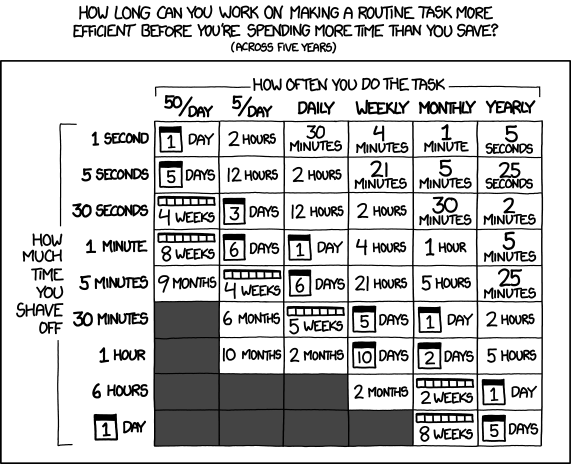
Generally automation works out in your favor, if you assume most off-hours alerts are going to take you at least 30 minutes to start up your computer, log in, verify the issue, and then resolve it.

XKCD 1205: How long you can work on making a task more efficient before there's no ROI

Be careful with your automation, however. There are many pitfalls that lie down this path, particularly with destructive resolutions like restarts and deletions. Heed this sage advice:

Consider just some of the following questions as you design your solution:

  • What happens if the state keeps changing between bad and good, a condition known as flapping?
  • When don’t you want this fix to automatically take place?
  • What happens if the fix fails mid-step?
  • Will the automatic resolution conflict with any intentional work, like downtimes, upgrades, or patching?

Start off cautiously and log what actions you would have taken. Then once you’re confident the automation always does the right thing, then you take off the training wheels.

Reinforce the weak points

Sometimes your environment just needs a bit of shoring up. There are weak points and single points of failure due to just natural growth.

Maybe the application is brittle and doesn’t try re-establishing connections after a network outage. This is a problem you can raise with the application team for them to fix.

Maybe the weak point is old fashioned capacity management. Add some more capacity because the business has outgrown what it was originally designed for. You’re out of disk or network or processing power to handle how things are today.

Maybe you need to consider higher availability solutions. Being able to transition seamlessly to a backup would mean your notification changes from “EVERYTHING IS DOWN!” to “Please address this by close of business today”.

Unfortunately these fixes involve time and money, which is why you may be hesitant to skip this section when it comes time to implementing what you’ve read here. It doesn’t have to be this way, you just have to demonstrate the value of having things improved. In other words, return on investment, or ROI.

If the impacted systems are revenue facing, where an outage means the company isn’t making money, the cost of downtime is fairly easy to calculate. The revenue you should have made minus the revenue you actually made will tell you how much that outage cost. This can be normalized to a per-hour basis so you can work with smaller outages like 5-10 minutes.

If your impacted systems are internal facing, where an outage means employees are annoyed or unable to do their work, you can ballpark a cost of the downtime using average employee cost per hour times the number of impacted employees.

Where do you get these costs? Generally you can get this from your manager, as they may already deal with these figures, or accounting.

All this napkin math (it’s impossible to be completely accurate for all situations) is simply to get upper management in the ballpark of missed opportunities and appropriately judge the cost of solutions against it. A $50,000 solution sounds expensive, but when it can save $75,000 in losses it starts to look more appealing.

The case for reduced support hours

Not everything needs to be running on a 24/7 basis. When have you made a special trip into work after hours to replace the paper or ink in the office printer? Likewise, not everything in the company needs to be supported around the clock. Sometimes there are workarounds available to the impacted employees, or they can perform another task first while the system is down.

You’ll need to work with the impacted groups, but it is possible to reduce the level of support from 24/7 to normal business hours. You’ll respond as normal to problems, but only during the designated times. The business may need more or around-the-clock coverage during peak season or “crunch time”, but your inbox will be better off the remainder of the year.

Remember, there’s a reason that your vendors charge more for faster support. The dollar cost for you or your organization covering everything 24/7 may not be immediately visible to your business in terms of wages, but it’s paid by employees not getting enough rest or impacting their work-life balance.

Don’t steal your own holidays

This whole process is as gradual or extreme as you’d like. But I encourage you to at least start working on your alerts today, and keep it in mind as you add new alerts. There will be setbacks, as new systems come online and existing systems change, but overall you’ll see a reduction in alerts over time.

Consider it this way: your monitoring system is a constant reminder of the work you did or did not put into it. Not putting anything at all into monitoring will result in you never knowing if systems are down. Not putting enough work into the system can result in frequent alerts, dragging you back to the office after hours.

Monitoring systems are a constant battle as your environment changes, but by keeping these strategies in mind you can help the future you enjoy the holidays without worrying about unstable systems and unnecessary alerts.

December 14, 2016

Day 14 - Terraform Deployment Strategy

Written by: Jon Brouse (@jonbrouse)
Edited by: Kerim Satirli (@ksatirli)

Introduction

HashiCorp’s infrastructure management tool, Terraform, is no doubt very flexible and powerful. The question is, how do we write Terraform code and construct our infrastructure in a reproducible fashion that makes sense? How can we keep code DRY, segment state, and reduce the risk of making changes to our service/stack/infrastructure?

This post describes a design pattern to help answer the previous questions. This article is divided into two sections, with the first section describing and defining the design pattern with a Deployment Example. The second part uses a multi-repository GitHub organization to create a Real World Example of the design pattern.

This post assumes you understand or are familiar with AWS and basic Terraform concepts such as CLI Commands, Providers, AWS Provider, Remote State, Remote State Data Sources, and Modules.

Modules

Essentially, any directory with one or more .tf files can be used as or considered a Terraform module. I am going to be creating a couple of module types and giving them names for reference. The first module type constructs all of the resources a service will need to be operational such as EC2 instances, S3 bucket, etc. The remaining module types will instantiate the aforementioned module type.

The first module type is a service module. A service module can be thought of as a reuseable library that deploys a single service’s infrastructure. Service modules are the brains and contain the logic to create Terraform resources. They are the “how” we build our infrastructure.

The other module types are environment modules. We will run our Terraform commands within this module type. The environment modules all live within a single repository, as compared to service modules, which live in individual repositories or alongside the code of the service they build infrastructure for. This is “where” our infrastructure will be built.

Deployment Example

I am going to start by describing how we would deploy a service and then deconstruct the concepts as we move through the deployment.

Running Terraform

As mentioned earlier, the environments repository is where we actually run the Terraform command to instantiate a service module. I’ve written a Bash wrapper to manage the service’s remote state configuration and ensure we always have to latest modules.

So instead of running terraform apply we will run ./remote.sh apply

The apply argument will set and get our remote state configuration, run a terraform get -update and then run terraform apply

Environment Module Example

Directory Structure

The environment module’s respository contains a strict directory hierarchy:

production-account (aws-account)
|__ us-east-1 (aws-region)
    |__ production-us-east-1-vpc (vpc)
        |__ production (environment)
            |__ ssh-bastion (service) 
               |__ remote.sh <~~~~~ YOU ARE HERE
Dynamic State Management

The directory structure is one of the cornerstones of this design as it enables us to dynamically generate the S3 key for a service’s state file. Within the remote.sh script (shown below) we parse the directory structure and then set/get our remote state.

A symlink of /templates/service-remote.sh to remote.sh is created in each service folder.

#!/bin/bash -e
# Must be run in the service's directory.

help_message() {
  echo -e "Usage: $0 [apply|destroy|plan|refresh|show]\n"
  echo -e "The following arguments are supported:"
  echo -e "\tapply   \t Refresh the Terraform remote state, perform a \"terraform get -update\", and issue a \"terraform apply\""
  echo -e "\tdestroy \t Refresh the Terraform remote state and destroy the Terraform stack"
  echo -e "\tplan    \t Refresh the Terraform remote state, perform a \"terraform get -update\", and issues a \"terraform plan\""
  echo -e "\trefresh \t Refresh the Terraform remote state"
  echo -e "\tshow    \t Refresh and show the Terraform remote state"
  exit 1
}

apply() {
  plan
  echo -e "\n\n***** Running \"terraform apply\" *****"
  terraform apply
}

destroy() {
  plan
  echo -e "\n\n***** Running \"terraform destroy\" *****"
  terraform destroy
}

plan() {
  refresh
  terraform get -update
  echo -e  "\n\n***** Running \"terraform plan\" *****"
  terraform plan
}

refresh() {

  account=$(pwd | awk -F "/" '{print $(NF-4)}')
  region=$(pwd | awk -F "/" '{print $(NF-3)}')
  vpc=$(pwd | awk -F "/" '{print $(NF-2)}')
  environment=$(pwd | awk -F "/" '{print $(NF-1)}')
  service=$(pwd | awk -F "/" '{print $NF}')

  echo -e "\n\n***** Refreshing State *****"

  terraform remote config -backend=s3 \
                          -backend-config="bucket=${account}" \
                          -backend-config="key=${region}/${vpc}/${environment}/${service}/terraform.tfstate" \
                          -backend-config="region=us-east-1"
}

show() {
  refresh
  echo -e "\n\n***** Running \"terraform show\"  *****"
  terraform show
}

## Begin script ##
if [ "$#" -ne 1 ] || [ "$1" = "-h" ] || [ "$1" = "--help" ]; then
  help_message
fi

ACTION="$1"

case $ACTION in
  apply|destroy|plan|refresh|show)
    $ACTION
    ;;
  ****)
    echo "That is not a vaild choice."
    help_message
    ;;
esac

Service Module Instantiation

In addition to remote.sh, the environment’s service directory contains a main.tf file.

module "environment" {
  source = "../"
}

module "bastion" {
  source = "git@github.com:TerraformDesignPattern/bastionhost.git"

  aws_account      = "${module.environment.aws_account}"
  aws_region       = "${module.environment.aws_region}"
  environment_name = "${module.environment.environment_name}"
  hostname         = "${var.hostname}"
  image_id         = "${var.image_id}"
  vpc_name         = "${module.environment.vpc_name}"
}

We call two modules in main.tf. The first is an environment module, which we’ll talk about in a moment, and the second is an environment service module.

Environment Service Module

Environment service module?

Everytime I’ve introduced this term, I’ve seen this…


Alt

An environment service module, or ESM for short, is just a way to specify, in conversation, that we are talking about the code that actually instantiates a service module.

If you look at the ESM declaration in main.tf above, you’ll see it is using the output from the enviroment module to define variables that will be passed into the service module. If we take a step back to review our directory structure we see the service we are deploying sits within the production environment’s directory:

sysadvent-production/us-east-1/production-us-east-1-vpc/production/ssh-bastion

Within the production environment’s directory is an outputs.tf file.

output "aws_account" {
  value = "production"
}

output "aws_region" {
  value = "us-east-1"
}

output "environment_name" {
  value = "production"
}

output "vpc_name" {
  value = "production-us-east-1-vpc"
}

We are able to create an entire service, regardless of resources, with a very generic ESM and just four values from our environment module. We are using our organization’s defined and somewhat colloquial terms to create our infrastructure. We don’t need to remember ARNs, ID’s or other allusive information. We don’t need to remember naming conventions either as the service module will take care of this for us.

Service Module Example

So far we’ve established a repeatable ways to run our Terraform command and guarantee that our state is managed properly and consistently. We’ve also instantiated a service module from within an environment service module. We are now going to dive into the components of a service module.

A service module will be reused throughout your infrastrcuture so it must be generic and parameterized. The module will create all Terraform provider resources required by the service.

In my experience, I’ve found splitting each resource type into its own file improves readability. Below is the list of Terraform files from our example bastion host service module repository:

bastionhost
|-- data.tf
|-- ec2.tf
|-- LICENSE
|-- outputs.tf
|-- providers.tf
|-- route53.tf
|-- security_groups.tf
`-- variables.tf

The contents of most of these files will look pretty generic to the average Terraform user. The power of this pattern lies within the data.tf as it allows the simplistic instantiation.

// Account Remote State
data "terraform_remote_state" "account" {
  backend = "s3"

  config {
    bucket = "${var.aws_account}"
    key    = "terraform.tfstate"
    region = "us-east-1"
  }
}

// VPC Remote State
data "terraform_remote_state" "vpc" {
  backend = "s3"

  config {
    bucket = "${var.aws_account}"
    key    = "${var.aws_region}/${var.vpc_name}/terraform.tfstate"
    region = "us-east-1"
  }
}

Sooooo. What populates the state file for the VPC data resources? Enter the VPC Service Module

There is no cattle.
There are no layers.
There is no spoon.

Everything is just a compartmentalized service. The module that creates your VPC is a separate “service” that lives in its own repository.

We create our account resources (DNS zones, SSL Certs, Users) within an account service module, our vpc resources from a VPC module within a vpc service module and our services (Application Services, RDS, Web Services) within an Environment Service Module.

We use a Bash wrapper to publish the state of resources in a consistent fashion.

Lastly, we abstract the complexity of infrastructure configuration management by querying Terraform state files based on a strict S3 key structure.

Real World Example

Follow along with the example by pulling the TerraformDesignPattern/environments repository. The configuration of each module within the environment repository will consist of roughly the same steps:

  1. Create the required files. Usually main.tf and variables.tf or simply an outputs.tf file.
  2. Populate variables.tf/outputs.tf with your desired values.
  3. Create a symlink to a specific remote.sh (account-remote.sh, service-remote.sh or vpc-remote.sh) from within the appropriate directory.
  4. For example, to create the remote.sh wrapper for your account service module, issue the following from within your environments/$ACCOUNT directory: ln -s ../templates/account-remote.sh remote.sh
  5. Run ./remote.sh apply

Prerequisites

  • Domain Name: I went over to Namecheap.com and grabbed the sysadvent.host domain name for $.88.
  • State File S3 Bucket: Create the S3 bucket to store your state files in. This should be the name of the account folder within your environments repository. For this example I created the sysadvent-production S3 bucket.
  • SSH Public Key: As of the writing of this post, the aws_key_pair Terraform resource does not currently support creating a public key, only importing one.
  • SSL ARN: AWS Certificate Manager offers free SSL/TLS certificates.

Getting Started

This Real World Example assumes you are provisioning a new AWS account and domain. For those working in a brown field, the following section provides a quick example of how to build a scaffolding that can be used to deploy the design pattern.

State Scaffolding or Fake It ’Til You Make It (With Terraform)

Within the environments/sysadvent-production account directory is an s3.tf file that creates a dummy_object in S3:

resource "aws_s3_bucket_object" "object" {
  bucket = "${var.aws_account}"
  key    = "dummy_object"
  source = "outputs.tf"
  etag   = "${md5(file("outputs.tf"))}"
}

A new object will be uploaded when outputs.tf is changed. This change updates the remote state file and thus any outputs that have been added to outputs.tf will be added to the remote state file as well. To use a resource (IAM Role, VPC ID, or Zone ID) that was not created with Terraform, simply add the desired data to the account, vpc, or ESM’s outputs.tf file. Since not all resources can be imported via data resources, this enables us to migrate in small, iterable phases.

In the example below, the AWS Account ID will be added to the account’s state file via this mechanism. The outputs.tf file defines the account ID via the aws_account variable:

output "aws_account" {
  value = "${var.aws_account}"
}

Stage One: Create The Account Service Module (ASM)

Working Directory: environments/sysadvent-production

As per the name, this is were account wide resources are created such as DNS Zones or Cloudtrail Logs. The sysadvent-production ASM will create the following:

  • Cloudwatch Log Stream for the account’s Cloudtrail
  • Import a public key
  • Route53 Zone
  • The “scaffolding” S3 dummy_object from outputs.tf to publish:
  • AWS Account ID
  • Domain Name
  • SSL ARN

Populate Variables

Populate the variables in the account’s variables.tf file:

aws_account - name of the account level folder
aws_account_id - your AWS provided account ID
domain_name - your choosen domain name
key_pair_name - what you want to name the key you are going to import
ssl_arn - ARN of the SSL certificate you created, free, with Amazon's Certificate Manager
public_key - the actual public key you want to import as your key pair

Execute!

Once you have created a state file S3 bucket and populated the variables.tf file with your desired values run ./remote.sh apply.

Stage Two: Create The VPC Service Module (VSM)

Working Directory: environments/sysadvent-production/us-east-1/production-us-east-1-vpc

The TerraformDesignPattern/vpc module creates the following resources:

  • VPC
  • Enable VPC Flow Logs
  • Cloudwatch Log Stream for the VPC’s Flow Logs
  • Flow Log IAM Policies
  • An Internet Gateway
  • Three private subnets
  • Three public subnets with nat gateways and elastic IP addresses
  • Routes, route tables, and associations

Populate Variables

Populate the following variables in the VSM’s variables.tf file:

availability_zones
aws_region
private_subnets
public_subnets
vpc_cidr
vpc_name

Execute!

Once you have populated the variables.tf file with your desired values, create the resources by running ./remote.sh apply.

Stage Three: Create The Environment Module

Working Directory: environments/sysadvent-production/us-east-1/production-us-east-1-vpc/production

The environment module stores the minimal amount of information required to pass to an environment service module. As mentioned previously, this module consists of a single outputs.tf file which requires you to configure the following:

aws_account
aws_region
environment_name
vpc_name

Stage Four: Create An Environment Service Module (ESM)

Working Directory: environments/sysadvent-production/us-east-1/production-us-east-1-vpc/production/elk

Congratulations, you’ve made it to the point where this wall of text really pays off.

Create the main.tf file. The ELK’s ESM calls an environment module, an ami_image_id module , and the ELK service module. The environment module supplies environment specific data such as the AWS account, region, environment name and VPC name. This module data is, in turn, passed to the ami_image_id module. The ami_image_id module will return AMI ID’s based on the enviroment’s region.

The ELK ESM will create the following resources:

  • Three instance ELK stack within the previously created private subnet.
  • The Elasticsearch instances will be clustered via the EC2 discovery plugin.
  • A public facing ELB to access Kibana.
  • A Route53 DNS entry pointing to the ELB.

Execute!

Once you created the main.tf file, create the resources by running ./remote.sh apply.

Appendix

Gotchas

During the development of this pattern I stumbled across a couple gotchas. I wanted to share these with you but didn’t think they were necessarily pertinent to an introductory article.

Global Service Resources

Example: IAM Roles

We want to keep the creation of IAM roles in a compartmentalized module but IAM roles are global thus you can only create them once. Using count and a lookup based on our region, we can tell Terraform to only create the IAM role in a single region.

Example iam.tf file:

...
count = "${lookup(var.create_iam_role, var.aws_region, 0)}"
...

Example variables.tf file:

...
variable "create_iam_role" {
  default = {
    "us-east-1" = 1
  }
}
...

Referencing an ASM or VSM From an ESM

The ASM and VSM create account and VPC resources, respectively. If you were to reference an ASM or VSM a la an environment module within an ESM, you’ll essentially be attempting to recreate the resources originally created by the ASM and VSM.

December 13, 2016

Day 13 - Injecting Modern Concepts into Legacy Processes

Written by: Michael Jenkins (@ManagedKaos)
Edited by: Ivana Ivanovic (@VoiceofIvana)

It’s great to read a blog post or listen to a podcast about the latest application or technology, then download it and have it up and running in just a few minutes.

At the same time, it’s a little depressing to think that the very same software you so easily got up-and-running on a workstation may not see a deployment on one of your production servers for months or even years — or ever.

So what does it take to bring new technology into a production environment? How do we get our legacy processes up to date?

If you start walking down the path to modernizing your technologies and processes, you may be surprised to find that getting from legacy to modern doesn’t have much to do with the tech and more to do with the processes and people involved in the transition.

Here are a few tips to get started.

Focus on the Pain Points; Build a Business Case

It’s easy to say you want a new tool because it’s, well…new. The specs look good. Maybe it’s open source and freely available. There’s probably a super popular conference that everyone is rushing to so they can learn more about it. And there’s even a company pushing the tool, swearing that you’ll see an improvement in your workflow orders of magnitude better than whatever you’re currently doing.

But don’t get lost in the newness of an application or a technique just for newness sake. Ask yourself “What problem really needs to be solved?”

One way to get past the allure of new tools — and find the right one—is to think about the pain points. What’s slowing you down as a developer or system administrator? What’s breaking over and over again to the point that fixing it becomes a painful routine? Will this new tool or technique solve those problems? If so, how?

In addition to focusing on the rough patches, gather metrics to show how things can improve.  For example, if a manual deployment is taking hours but it can be shortened to a few minutes with an automation tool, that makes for a compelling case. Metrics also arm you with facts to back up statements and answer questions.

In the end, you’ll want to make a business case for why things need to change and how productivity will improve.

Find Allies, Share, and Collaborate

Once potential improvements have been identified, it’s time to start spreading the word.  Share your findings with your team and managers; propose potential solutions. This can be a tough step since you may be proposing something that changes the status quo or may cause your company to incur a cost in training or software licensing.

Whatever the perceived roadblocks may be, it’s good to recruit allies that agree with your message. An easy way to pick up allies is to find others outside of your immediate team that may benefit from the change or the new technique you’re proposing.

A good example is an application that benefits both development and operations teams, like Application Performance Monitoring (APM).  

Adding APM could bring more insight into the way an application runs and the way the server running the application performs. If a problem happens and causes downtime, both devs and ops can use the APM data to figure out what went wrong and then take steps to prevent the same thing from happening again.

With the prospect of identifying and resolving problems, developers and operators can share a common, collaborative interest.

Start Small and Build from the Bottom Up

Once there’s some traction to make a change, it’s best to start with an easy win. Starting with something small is a good way to build confidence in the change while working out issues.

Let’s go back to the deployment example. Perhaps it’s the case that the manual deployment is done by a different administrator each time without a runbook. Maybe the team feels they know the deployment so well they can wing it without following a script or checklist, but occasionally a step gets skipped, causing rollbacks or rework that lengthens deployments and makes them unpredictable.

An easy, technology-independent way to improve this example process is to clearly document the deployment and share the doc with everyone. Once the deployment steps are documented, the next step would be to automate each step using a scripting language or specialized tool.  Having the script be an executable description of the deployment means it should run consistently, independent of the admin that runs it.

Once the deployment script is being executed consistently, it is much easier for the team to think about adding an automation tool—like Jenkins or Rundeck—to manage the deployment. Suddenly, introducing a new technology seems not only painless but necessary. And once the deployment is completely automated, the next step might be to add continuous integration so that deployments happen frequently and without much human interaction.

In closing…

Reading this post’s title, you probably imagined it’d be all about containers, microservices, and the promise of new technologies that are changing the way we work as developers and system administrators.  But this post is really about people: convincing them (with a strong business case built on metrics), finding common ground and interest, and easing team members into the changes that come with new technology.

The best part about this approach? Before you even start advocating a new tool, you will have checked your own motivation to make sure you are not falling for the allure of something shiny and new.  Instead, you’ll be prepared to bring real value to your organization.